Archive for November, 2010
VBA – Define PageSetup (PaperSize, Orientation, etc.) and Print Excel Sheet
This posts explains how to print an Excel page using VBA and PrintOut. Normally, you will want to define the PageSetup first, in order to make sure that the right printer, the right paper size (fx A4), orientation (landscape or portrait), etc. is selected.
Step 1: Define PageSetup.
With Worksheets("MyPage").PageSetup
     .Orientation = xlPortrait
     .Zoom = False
     .FitToPagesWide = 1
     .FitToPagesTall = 1
     .PaperSize = xlPaperA4
End With
It’s important to add the Zoom property in adition to the FitTo... properties, as you can otherwise not be sure that the printing in fact is restricted to 1×1 page.
Step 2: Print the page.
Sheets("MyPage").PrintOut Copies:=1, Collate:=True
And that’s it!
VBA UserForm – How to automatically switch to next Textbox
The code-snippet presented in this very first post on my blog is helpful when the user has to enter data in TextBoxes in a UserForm, using VBA for Excel.
What we want to achieve is that whenever the user has entered 6 characters in TextBox1, then TextBox2 is selected by default. That way, the user does not need to used either TAB or the mouse to select the next TextBox:
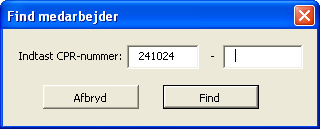
We will need to create a sub that is called whenever a Change is made to TextBox1. We need to use the TextLength and the SetFocus, like shown below:
Private Sub TextBox1_Change()
           'whenever there are 6 characters registered in the TextBox
           If TextBox1.TextLength = 6 Then
            'select (SetFocus) the next TextBox
           TextBox2.SetFocus
End If
Of course, the code-snippet has to be added in the code-behind of the UserForm. Make sure that you have build your Sub correctly by verifying that you have chosen TextBox1 and Change, and not just General at the top of the page:

| M | T | W | T | F | S | S |
|---|---|---|---|---|---|---|
| 1 | 2 | 3 | 4 | 5 | 6 | 7 |
| 8 | 9 | 10 | 11 | 12 | 13 | 14 |
| 15 | 16 | 17 | 18 | 19 | 20 | 21 |
| 22 | 23 | 24 | 25 | 26 | 27 | 28 |
| 29 | 30 | |||||
Recent Posts
- VBA – Import CSV file
- VBA – Get name of file without extension
- UserForm Listbox – Populate list and extract selected items
- VBA – Retrieve Last Row From More Than One Column
- VBA – Check Extension of File
- VBA – Delete PivotTables
- VBA – Add New WorkSheet After The Last Worksheet
- VBA – Toggle Between Open Excel Files
- VBA – Looping through all files in a folder
- VBA – Create and add items to dynamic arrays
- VBA – Loop through arrays
- Excel formula – Miscellaneous
- VBA – Delete all files in a folder
- VBA – Loop through sheets
- VBA – Define PageSetup (PaperSize, Orientation, etc.) and Print Excel Sheet